briefly
Describe the document you need and watch it typeset itself — an AI chat assistant that drafts print-ready PDFs in real time
About briefly
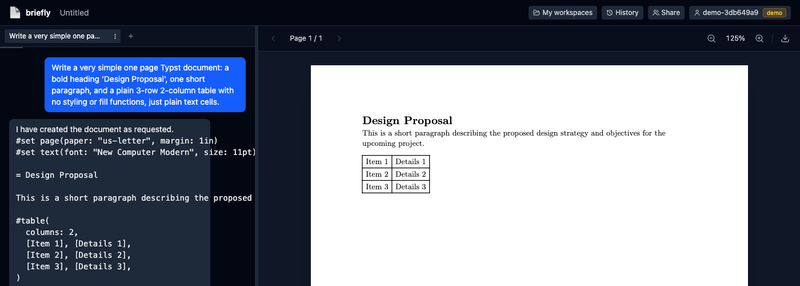
briefly pairs an AI chat assistant with a live, compiled document preview. Describe what you need — a resume, a one-page proposal, a flyer — and the assistant writes real Typst markup, compiles it with the actual Typst engine, and shows you the print-ready PDF as it's built.
Unlike a word processor, briefly's assistant can see its own work: it renders pages back to itself to check spacing and layout, and it can hand-author SVG diagrams, preview them, and refine them before placing them in the document. Every change is versioned automatically, so nothing is ever lost and any version can be restored non-destructively.
Key Features
Conversational Drafting
Chat with an AI assistant that writes and revises real Typst source — headings, tables, images, page layout — from plain-English requests.
Live Compiled Preview
Every change recompiles the actual document with the Typst engine and renders it client-side, so you always see the true print-ready output.
Visual Self-Checking
The assistant can capture the rendered page and hand-authored diagrams as images to check its own spacing, alignment, and layout before calling a change done.
Non-Destructive Version History
Every AI turn that changes the document is checkpointed automatically. Browse, preview, or restore any past version — nothing is ever deleted.
Logos, Photos & Diagrams
Drag and drop a logo or reference image into the chat and ask the assistant to place it, or have it author and preview an SVG diagram from scratch.
Shareable Workspaces
Invite collaborators with view or edit access, and pick up any conversation exactly where you left off with full chat history restored.
How It Works
- 1Describe the document in the chat panel — "Draft a one-page design services proposal with a pricing table"
- 2The assistant writes Typst source and the document compiles and renders on the right in real time
- 3It checks its own layout by rendering the page back to itself, and iterates if something looks off
- 4Drop in a logo or ask for a diagram, and the assistant places it and previews the result before moving on
- 5Browse the version history at any point to preview or restore an earlier draft — nothing is ever lost
Under the Hood
Backend
Go server with SSE streaming, SQLite-backed workspaces and version history, and an OpenAI-compatible LLM proxy with a tool-calling loop.
Compiler
The real Typst CLI compiles documents server-side under a memory limit and bounded concurrency — no separate sandbox needed, since Typst can't execute arbitrary code.
Frontend
React + TypeScript with TailwindCSS. pdf.js renders the compiled PDF entirely client-side for page navigation, zoom, and download.
Deployment
Dockerized multi-stage build deployed to a k3s cluster via a Helm chart and Gitea Actions CI/CD, with rate limiting and payload caps for public access.
What You Can Build With It
Resumes & Cover Letters
Polished, print-ready layouts drafted from a plain description
Proposals & Reports
Structured documents with tables, headings, and pricing breakdowns
Flyers & One-Pagers
Logo placement and simple diagrams, typeset and ready to print
Want AI-Powered Document Tools of Your Own?
briefly is a live product demo. We build custom AI-integrated tools for teams — let's talk about what we can create for you.
Contact SalesHave a project like this one?
We'd be glad to talk through your goals, your constraints, and whether we're the right team for the work.